RSVP panel
All your guests’ RSVPs in one place
The panel is your private page that comes with your invitation. Every reply a guest sends from the invitation arrives in the panel instantly, so you always know who is coming, how many, and what your guests answered. No copying messages and no spreadsheets kept by hand.
How it works
From a guest’s reply to your list
The guest replies
In the invitation they say whether they are coming, how many, and answer your questions. Nothing to install.
It lands in the panel
The reply appears in your panel the same second, without reloading the page.
You follow and export
See the numbers, search your guests and download an Excel list in one click.
Guests can fix it
After sending, each guest gets their own edit link, so they can correct a mistake themselves.
What you see in the panel
Everything you need to organise your guests
The panel is made for couples and organisers: clear, tidy and nothing you don’t need.
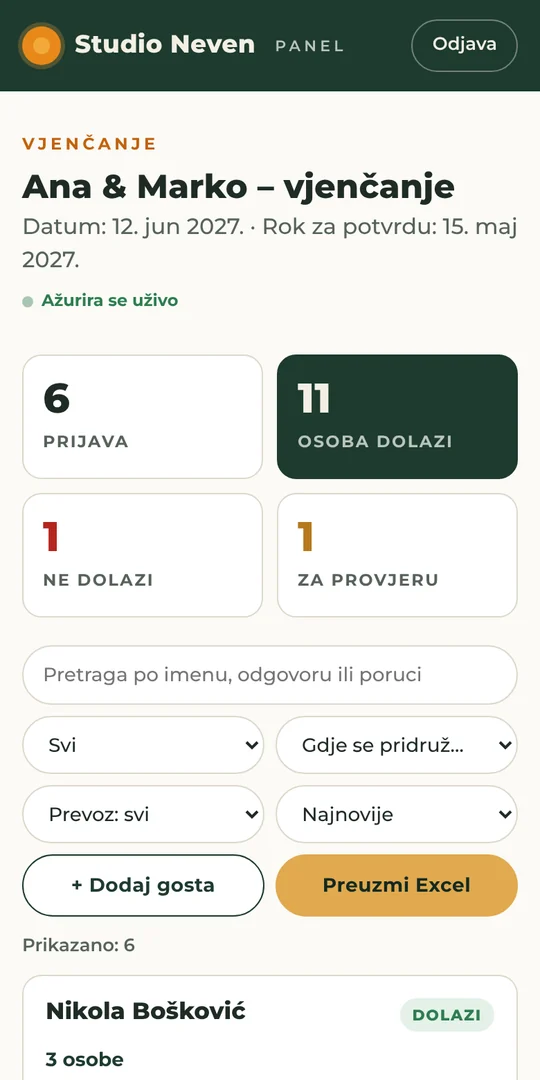
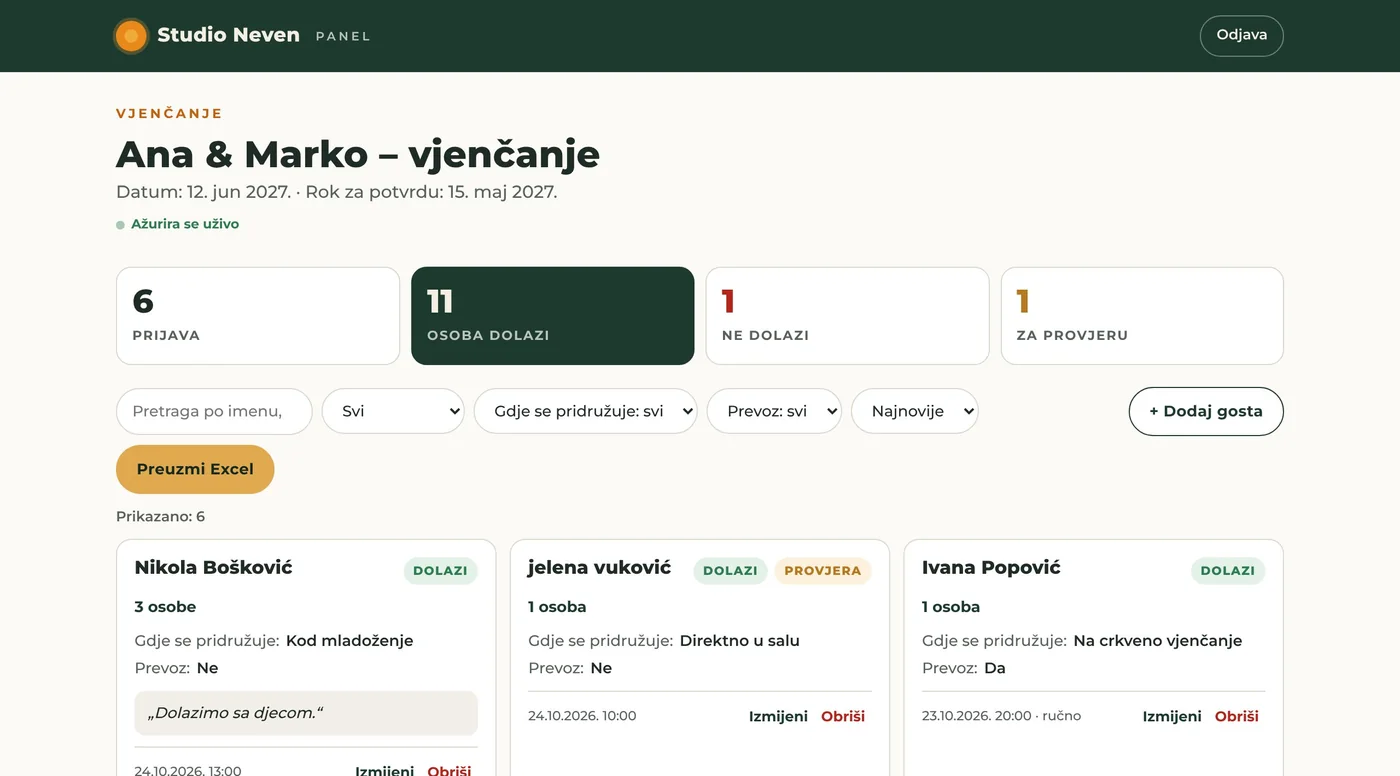
Numbers at the top
Number of replies, total guests coming, who can’t make it and what needs checking.
A card for every guest
Name, number of guests, answers to your questions and the message they left you.
Search and filters
Search by name, answer or message and filter by attendance and answers.
Excel list
Download every reply in one click, ready for the venue, the caterer or the seating plan.
Your questions
Children and their ages, transport, accommodation, where the guest joins, or a menu choice.
You stay in control
Add a guest yourself, edit or delete. Late replies are marked, and possible duplicates are flagged for you to check.
On any device
On your phone and your computer
The panel opens in the browser, on a phone, tablet or computer. No app needed.
Privacy
Private and secure
- Only you open the panel, by signing in to your account with a password.
- You can give access to your partner or parents too, and if you like, view-only access without editing.
- Every event is completely separate: nobody else sees your guests.
- Guests can’t see who else has replied.
- Every reply is also kept as a backup copy.
- The system has been tested for a wedding with 500 guests.
How much is the panel?
The panel can be added to any invitation with RSVP. If you don’t need it, replies still reach you by email or WhatsApp, just like before.
For example: invitation 35 € and panel 10 €, 45 € in total.
Calculate the priceQuestions
Frequently asked questions
How do I sign in to the panel?
When your invitation is ready, you get a link to the panel and your sign-in details. You sign in with your email and password, from any device.
Can guests see who else has replied?
No. Guests only see the invitation and their own reply. Only you and the people you give access to see the list.
What if a guest makes a mistake?
After sending, the guest gets a link to change their reply. You can also edit it directly in the panel.
Can I add guests who replied by phone?
Yes. You can add a guest yourself in the panel, so every reply stays on one list.
What if someone replies after the deadline?
The reply is accepted and shows up in the panel as usual, marked as late.
How many guests can the panel handle?
The panel has been tested for a wedding with 500 guests, with hundreds of replies sent at the same time.
Can I get a list for the venue?
Yes. One click downloads an Excel file with the full list and every answer.
Contact
Let’s create your invitation
Fill in a few fields and send us a message by email or WhatsApp. We’ll get back to you with ideas and a price, usually the same day. We work with clients from anywhere.